 andremion/Floating-Navigation-View
Download
Step 1. Add the JitPack repository to your build file
Add it in your root settings.gradle at the end of repositories:
	dependencyResolutionManagement {
		repositoriesMode.set(RepositoriesMode.FAIL_ON_PROJECT_REPOS)
		repositories {
			mavenCentral()
			maven { url 'https://jitpack.io' }
		}
	}
Add it in your settings.gradle.kts at the end of repositories:
	dependencyResolutionManagement {
		repositoriesMode.set(RepositoriesMode.FAIL_ON_PROJECT_REPOS)
		repositories {
			mavenCentral()
			maven { url = uri("https://jitpack.io") }
		}
	}
Add to pom.xml
	<repositories>
		<repository>
		    <id>jitpack.io</id>
		    <url>https://jitpack.io</url>
		</repository>
	</repositories>
Add it in your build.sbt at the end of resolvers:
resolvers += "jitpack" at "https://jitpack.io"
Add it in your project.clj at the end of repositories:
:repositories [["jitpack" "https://jitpack.io"]]
Step 2. Add the dependency
	dependencies {
		implementation 'com.github.andremion:Floating-Navigation-View:1.3.0'
	}
dependencies {
implementation("com.github.andremion:Floating-Navigation-View:1.3.0")
} <dependency>
<groupId>com.github.andremion</groupId>
<artifactId>Floating-Navigation-View</artifactId>
<version>1.3.0</version>
</dependency>
libraryDependencies += "com.github.andremion" % "Floating-Navigation-View" % "1.3.0"
:dependencies [[com.github.andremion/Floating-Navigation-View "1.3.0"]]
Readme










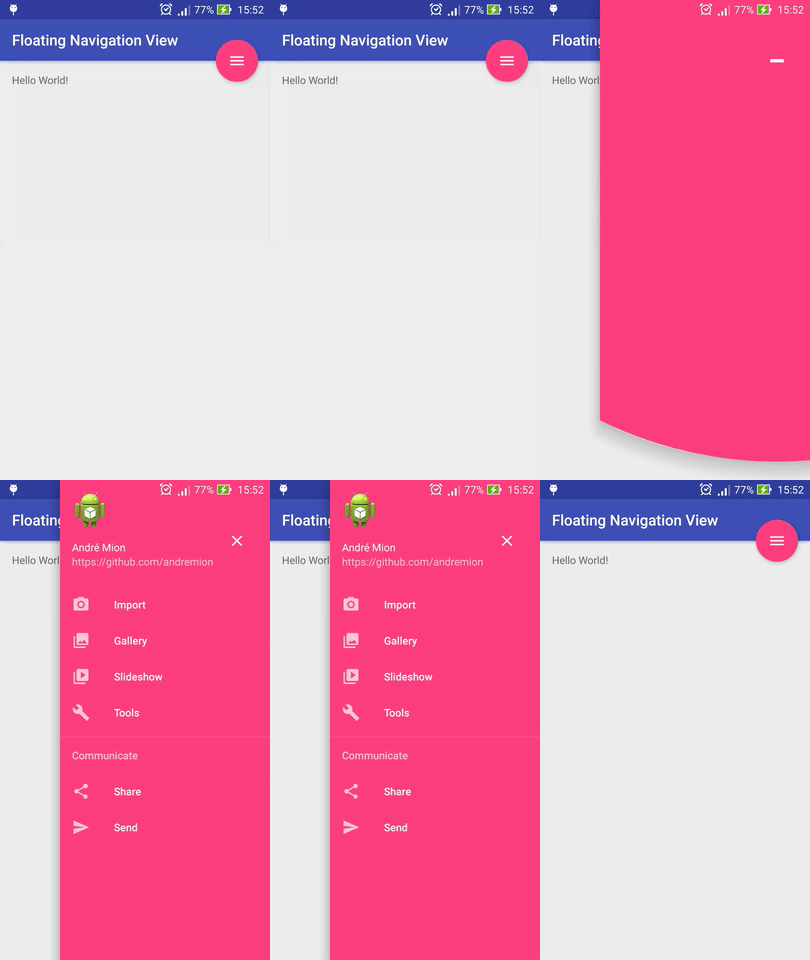
Floating Navigation View
A simple Floating Action Button that shows an anchored Navigation View and was inspired by Menu Material Fixed created by Tommaso Poletti
Installation
Include the library in your build.gradle
dependencies{
    compile 'com.github.andremion:floatingnavigationview:1.3.0'
}
or in your pom.xml if you are using Maven
<dependency>
  <groupId>com.github.andremion</groupId>
  <artifactId>floatingnavigationview</artifactId>
  <version>1.3.0</version>
  <type>aar</type>
</dependency>
Usage example
<?xml version="1.0" encoding="utf-8"?>
<androidx.coordinatorlayout.widget.CoordinatorLayout
    xmlns:android="http://schemas.android.com/apk/res/android"
    xmlns:app="http://schemas.android.com/apk/res-auto"
    android:layout_width="match_parent"
    android:layout_height="match_parent">

    <com.google.android.material.appbar.AppBarLayout
        android:layout_width="match_parent"
        android:layout_height="wrap_content"
        android:fitsSystemWindows="true">

    ...

    <com.andremion.floatingnavigationview.FloatingNavigationView
        android:id="@+id/floating_navigation_view"
        android:layout_width="wrap_content"
        android:layout_height="wrap_content"
        android:layout_margin="@dimen/fab_margin"
        android:theme="@style/AppTheme.AppBarOverlay"
        app:layout_anchor="@id/toolbar"
        app:layout_anchorGravity="bottom|end"
        app:drawMenuBelowFab="true"
        app:headerLayout="@layout/navigation_view_header"
        app:menu="@menu/menu_navigation_view" />

</androidx.coordinatorlayout.widget.CoordinatorLayout>
Custom attributes
-
The menu resource to inflate and populate items from
<attr name="menu" format="reference" /> -
Layout resource to inflate as the header
<attr name="headerLayout" format="reference" /> -
Item text customizations
<attr name="itemIconTint" format="color"/><attr name="itemTextColor" format="color"/><attr name="itemBackground" format="reference"/><attr name="itemTextAppearance" format="reference"/> -
If menu must be drawn below the FAB
<attr name="drawMenuBelowFab" format="boolean" />
The recommended way to customize the background color is by using the app:backgroundTint attribute in xml or setBackgroundTintList in Java
<com.andremion.floatingnavigationview.FloatingNavigationView
        android:id="@+id/floating_navigation_view"
        android:layout_width="wrap_content"
        android:layout_height="wrap_content"
        app:backgroundTint="#009688" />
mNavigationView.setBackgroundTintList(ColorStateList.valueOf(Color.parseColor("#009688")));
You can also set the button icon color according to the theme by setting the android:tint to a theme attribute:
<com.andremion.floatingnavigationview.FloatingNavigationView
        android:id="@+id/floating_navigation_view"
        android:layout_width="wrap_content"
        android:layout_height="wrap_content"
        android:tint="?android:textColorPrimary" />
See more at the sample
Libraries and tools used in the project
- Design Support Library The Design package provides APIs to support adding material design components and patterns to your apps.
- VectAlign VectAlign is a developer's tool which aligns two VectorDrawable "pathData" strings (or SVG images) in order to allow morphing animations between them using an AnimatedVectorDrawable.
License
Copyright 2019 André Mion

Licensed under the Apache License, Version 2.0 (the "License");
you may not use this file except in compliance with the License.
You may obtain a copy of the License at

    http://www.apache.org/licenses/LICENSE-2.0

Unless required by applicable law or agreed to in writing, software
distributed under the License is distributed on an "AS IS" BASIS,
WITHOUT WARRANTIES OR CONDITIONS OF ANY KIND, either express or implied.
See the License for the specific language governing permissions and
limitations under the License.