 Ernestchang/JsBridge-1
Download
Step 1. Add the JitPack repository to your build file
Add it in your root settings.gradle at the end of repositories:
	dependencyResolutionManagement {
		repositoriesMode.set(RepositoriesMode.FAIL_ON_PROJECT_REPOS)
		repositories {
			mavenCentral()
			maven { url 'https://jitpack.io' }
		}
	}
Add it in your settings.gradle.kts at the end of repositories:
	dependencyResolutionManagement {
		repositoriesMode.set(RepositoriesMode.FAIL_ON_PROJECT_REPOS)
		repositories {
			mavenCentral()
			maven { url = uri("https://jitpack.io") }
		}
	}
Add to pom.xml
	<repositories>
		<repository>
		    <id>jitpack.io</id>
		    <url>https://jitpack.io</url>
		</repository>
	</repositories>
Add it in your build.sbt at the end of resolvers:
resolvers += "jitpack" at "https://jitpack.io"
Add it in your project.clj at the end of repositories:
:repositories [["jitpack" "https://jitpack.io"]]
Step 2. Add the dependency
	dependencies {
		implementation 'com.github.ernestchang:jsbridge-1:v1.3.4'
	}
dependencies {
implementation("com.github.ernestchang:jsbridge-1:v1.3.4")
} <dependency>
<groupId>com.github.ernestchang</groupId>
<artifactId>jsbridge-1</artifactId>
<version>v1.3.4</version>
</dependency>
libraryDependencies += "com.github.ernestchang" % "jsbridge-1" % "v1.3.4"
:dependencies [[com.github.ernestchang/jsbridge-1 "v1.3.4"]]
Readme
Add to fix
在Android7.0手机上因为调用onPageFinish()方法时机不确定,而直接加载本地javascript,导致页面显示空白异常。
报错: Android Webview: Cannot call determinedVisibility() - never saw a connection for the pid
解决办法:
等webView.loadUrl()加载完毕,调用onPageFinished()时,延迟100毫秒加载本地javascript
@Override
    public void onPageFinished(final WebView view, String url) {
        super.onPageFinished(view, url);

        if (BridgeWebView.toLoadJs != null) {
            view.postDelayed(new Runnable() {
                @Override
                public void run() {
                    BridgeUtil.webViewLoadLocalJs(view, BridgeWebView.toLoadJs);
                }
            }, 100);
        }

       ...
    }
load mixed https and http html : 解决android 6.0 webview加载https出现空白页问题
解决办法:
 webView.setWebViewClient(new WebViewClient(){
    @Override
    public void onReceivedSslError(WebView view, SslErrorHandler handler, SslError error){
       //注意:super句话一定要删除,或者注释掉,否则又走handler.cancel()默认的不支持https的了。
       //super.onReceivedSslError(view, handler, error);
       //handler.cancel(); // Android默认的处理方式
       //handler.handleMessage(Message msg); // 进行其他处理

        handler.proceed(); // 接受所有网站的证书
            }
        });
但是在6.0的手机上依然是显示空白页, 解决办法:添加如下代码
/**
 *  Webview在安卓5.0之前默认允许其加载混合网络协议内容
 *  在安卓5.0之后,默认不允许加载http与https混合内容,需要设置webview允许其加载混合网络协议内容
    */
    if (Build.VERSION.SDK_INT >= Build.VERSION_CODES.LOLLIPOP) {
                   webview.getSettings().setMixedContentMode(WebSettings.MIXED_CONTENT_ALWAYS_ALLOW);

}
JsBridge
inspired and modified from this and wechat jsBridge file, with some bugs fix and feature enhancement.
This project make a bridge between Java and JavaScript.
It provides safe and convenient way to call Java code from js and call js code from java.
Demo
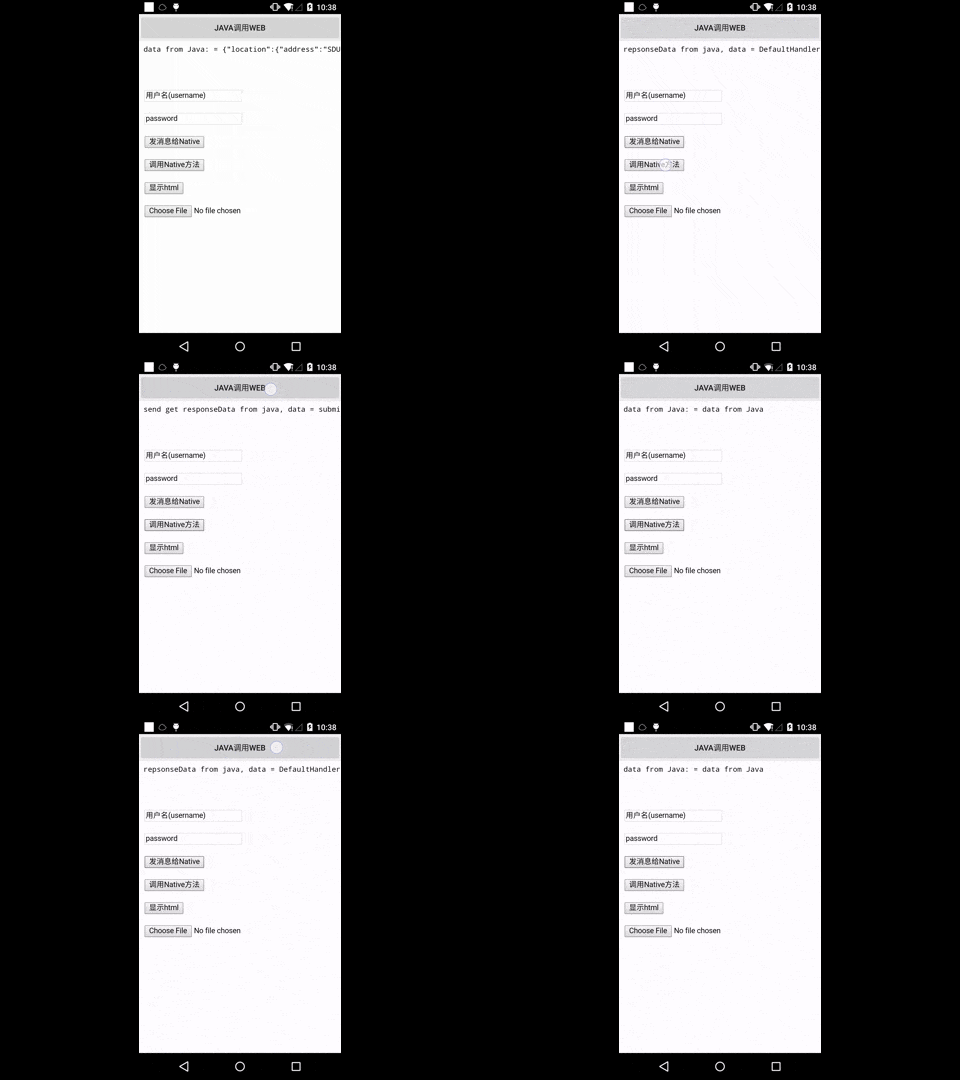
Usage
JitPack.io
I strongly recommend https://jitpack.io
repositories {
    // ...
    maven { url "https://jitpack.io" }
}

dependencies {
    compile 'com.github.lzyzsd:jsbridge:1.0.4'
}
Use it in Java
add com.github.lzyzsd.jsbridge.BridgeWebView to your layout, it is inherited from WebView.
Register a Java handler function so that js can call
    webView.registerHandler("submitFromWeb", new BridgeHandler() {
        @Override
        public void handler(String data, CallBackFunction function) {
            Log.i(TAG, "handler = submitFromWeb, data from web = " + data);
            function.onCallBack("submitFromWeb exe, response data from Java");
        }
    });
js can call this Java handler method "submitFromWeb" through:
    WebViewJavascriptBridge.callHandler(
        'submitFromWeb'
        , {'param': str1}
        , function(responseData) {
            document.getElementById("show").innerHTML = "send get responseData from java, data = " + responseData
        }
    );
You can set a default handler in Java, so that js can send message to Java without assigned handlerName
webView.setDefaultHandler(new DefaultHandler());
    window.WebViewJavascriptBridge.send(
        data
        , function(responseData) {
            document.getElementById("show").innerHTML = "repsonseData from java, data = " + responseData
        }
    );
Register a JavaScript handler function so that Java can call
    WebViewJavascriptBridge.registerHandler("functionInJs", function(data, responseCallback) {
        document.getElementById("show").innerHTML = ("data from Java: = " + data);
        var responseData = "Javascript Says Right back aka!";
        responseCallback(responseData);
    });
Java can call this js handler function "functionInJs" through:
    webView.callHandler("functionInJs", new Gson().toJson(user), new CallBackFunction() {
        @Override
        public void onCallBack(String data) {

        }
    });
You can also define a default handler use init method, so that Java can send message to js without assigned handlerName
for example:
    bridge.init(function(message, responseCallback) {
        console.log('JS got a message', message);
        var data = {
            'Javascript Responds': 'Wee!'
        };
        console.log('JS responding with', data);
        responseCallback(data);
    });
webView.send("hello");
will print 'JS got a message hello' and 'JS responding with' in webview console.
Notice
This lib will inject a WebViewJavascriptBridge Object to window object. So in your js, before use WebViewJavascriptBridge, you must detect if WebViewJavascriptBridge exist. If WebViewJavascriptBridge does not exit, you can listen to WebViewJavascriptBridgeReady event, as the blow code shows:
    if (window.WebViewJavascriptBridge) {
        //do your work here
    } else {
        document.addEventListener(
            'WebViewJavascriptBridgeReady'
            , function() {
                //do your work here
            },
            false
        );
    }
License
This project is licensed under the terms of the MIT license.