 ZuoHailong/AppUpdate
Download
Step 1. Add the JitPack repository to your build file
Add it in your root settings.gradle at the end of repositories:
	dependencyResolutionManagement {
		repositoriesMode.set(RepositoriesMode.FAIL_ON_PROJECT_REPOS)
		repositories {
			mavenCentral()
			maven { url 'https://jitpack.io' }
		}
	}
Add it in your settings.gradle.kts at the end of repositories:
	dependencyResolutionManagement {
		repositoriesMode.set(RepositoriesMode.FAIL_ON_PROJECT_REPOS)
		repositories {
			mavenCentral()
			maven { url = uri("https://jitpack.io") }
		}
	}
Add to pom.xml
	<repositories>
		<repository>
		    <id>jitpack.io</id>
		    <url>https://jitpack.io</url>
		</repository>
	</repositories>
Add it in your build.sbt at the end of resolvers:
resolvers += "jitpack" at "https://jitpack.io"
Add it in your project.clj at the end of repositories:
:repositories [["jitpack" "https://jitpack.io"]]
Step 2. Add the dependency
	dependencies {
		implementation 'com.github.zuohailong:appupdate:0.2.6'
	}
dependencies {
implementation("com.github.zuohailong:appupdate:0.2.6")
} <dependency>
<groupId>com.github.zuohailong</groupId>
<artifactId>appupdate</artifactId>
<version>0.2.6</version>
</dependency>
libraryDependencies += "com.github.zuohailong" % "appupdate" % "0.2.6"
:dependencies [[com.github.zuohailong/appupdate "0.2.6"]]
Readme
APP版本更新
示例
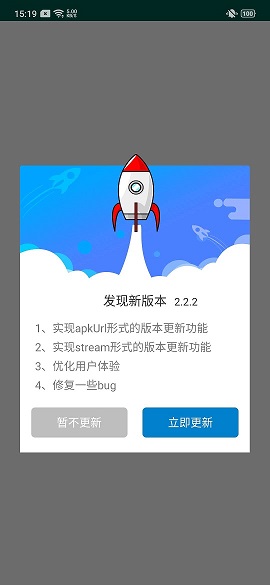
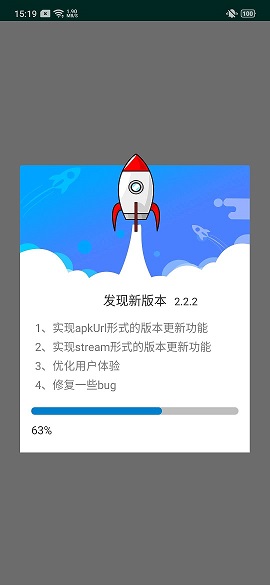

功能介绍
-
支持指向apk文件的 url 形式的版本更新
-
支持指向接口、接口返回二进制文件流的 url 形式的版本更新
-
支持断点下载
-
采用 Service + AsyncTask 方式下载
-
提供界面友好的版本更新提示弹窗,可自定义其主题样式
-
兼容Android 6.0,更新库自动获取写权限,用户拒绝后可再次请求
-
兼容Android 7.0,支持FileProvider
-
兼容Android 8.0,应用安装无障碍
-
实现国际化(支持中文和英文)
Gradle依赖
    dependencies {
	        implementation 'com.github.ZuoHailong:AppUpdate:0.2.6'
	}
简单使用
	AppUpdateManager.Builder builder = new AppUpdateManager.Builder(MainActivity.this);
	builder.apkUrl(String apkUrl)
            .updateContent(String[] array)
            .updateForce(boolean isForce)
            .build();
Builder详细用法
一、功能性设置
1、设置apk下载链接
builder.apkUrl(String apkUrl)
2、设置版本更新内容
builder.apkUrl(String[] array)
3、设置是否必须更新
builder.updateForce(boolean isForce)
4、设置新版本的版本名,形如“1.0.2”
builder.newVerName(String newVerName)
5、设置更新框标题,默认“发现新版本”
builder.title(String title)
6、设置确认按钮文字,默认“立即更新”
builder.confirmText(String confirmText)
7、设置取消按钮文字,默认“暂不更新”
builder.cancelText(String cancelText)
8、设置待下载apk文件大小
builder.apkContentLength(long apkContentLength)
注意:
- 当apkUrl直接指向待下载文件时,不需要作此设置,可自动获取待下载文件大小;
- 当apkUrl指向server端接口,在接口的response中以二进制流形式下载时,此值必需设置,否则会提示“更新出错”。
9、设置是否支持断点下载
builder.breakpoint(boolean breakpoint)
注意:
- 当apkUrl直接指向待下载文件时,不需要作此设置,默认支持断点下载;
- 当apkUrl指向server端接口,在接口的response中以二进制流形式下载时,此值是可选设置,默认为false(若设为true,一定要与server端小伙伴确定是否支持断点下载)。
10、开始构建并弹出更新框
builder.build()
二、样式设置
1、设置更新框顶部背景图,要求传入drawable资源id
builder.topResId(@DrawableRes int topResId)
2、设置确定按钮背景色,要求传入Color资源
builder.confirmBgColor(@ColorInt int color)
3、设置确定按钮背景图,要求传入drawable资源id
builder.confirmBgResource(@DrawableRes int resid)
4、设置取消按钮背景色,要求传入Color资源
builder.cancelBgColor(@ColorInt int color)
5、设置取消按钮背景图,要求传入drawable资源id
builder.cancelBgResource(@DrawableRes int resid)
6、设置进度条样式,要求传入drawable资源id
builder.progressDrawable(@DrawableRes int resid)